.svg)
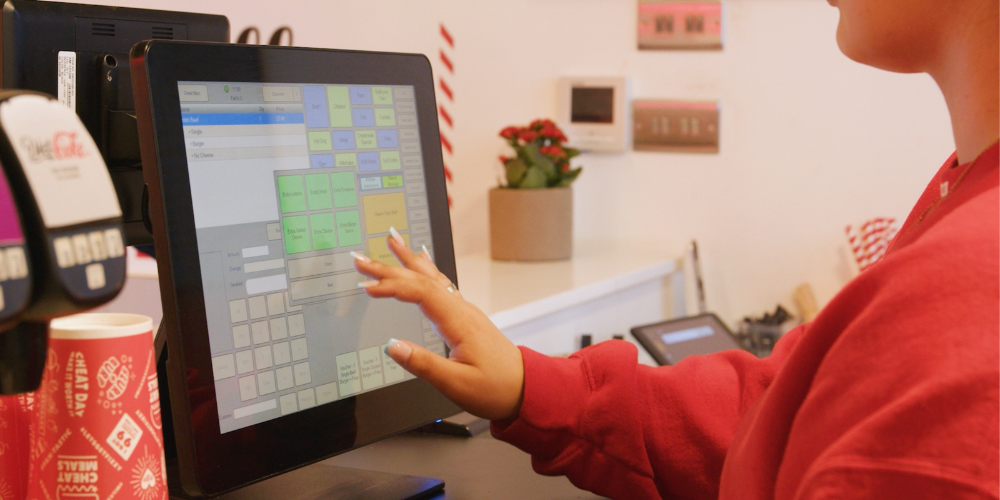
Running a restaurant involves juggling many tasks. From managing staff to ensuring customer satisfaction, the challenges are endless. A restaurant POS system can simplify these tasks.
These systems are more than just cash registers. They integrate sales, inventory, and customer management. This integration streamlines operations and boosts efficiency.
Modern POS systems offer cloud-based solutions. This means you can access data anytime, anywhere. Real-time updates keep you informed and in control.
Choosing the right POS system is crucial. It can enhance customer experience and improve profitability. The best systems offer features tailored to your needs.
In the UK, EPOS systems are popular. They cater to the unique demands of the restaurant industry in 2026. Understanding these systems can give your restaurant a competitive edge.
This guide will explore everything you need to know. From features to costs, we cover it all. Let's dive into the world of restaurant POS systems.
Section 1: Fundamentals & Terminology
What is a POS System?
A POS (Point of Sale) system is a combination of hardware and software. It is designed to handle sales transactions. These systems are crucial for modern businesses.
POS systems manage various business operations. They process payments and track inventory. Also, they provide sales analytics and customer data.
Key components of a POS system include:
- Touchscreen display: For easy interaction.
- Card reader: For processing payments.
- Receipt printer: To provide transaction records.
These systems streamline operations, improve accuracy, and enhance customer experiences. By integrating various functions, they reduce manual errors. This efficiency benefits both small and large businesses. Selecting the right system can significantly impact a business's success.
What is an EPOS System?
An EPOS (Electronic Point of Sale) system is an advanced version of a POS system. It digitizes transactions and records. EPOS systems are widely used in various retail sectors.
They offer real-time inventory updates. This feature helps in managing stock levels efficiently. Additionally, they support multi-location management.
Key features of EPOS systems include:
- Cloud-based storage: For secure data management.
- Advanced reporting tools: To analyze sales trends.
- Integration capabilities: With other business software.
EPOS systems provide a more comprehensive solution compared to traditional POS systems. They improve operational efficiency and customer interactions.
What is a Restaurant POS System?
A restaurant POS system is tailored specifically for dining establishments. It manages orders, payments, and dining operations. These systems are crucial for smooth restaurant functioning.
They handle various tasks uniquely suited to restaurants. These include menu management and table service. They also support online orders and delivery logistics.
Key features of restaurant POS systems include:
- Order management: Streamlines kitchen communication.
- Table management: Optimizes seating and reservations.
- Customer loyalty integration: Encourages repeat visits.
These systems help enhance the dining experience. They ensure quick service and accurate order processing. A robust restaurant POS can improve staff productivity and customer satisfaction. Selecting the right system is key for operational success.
What is an EPOS System for Restaurant and Hospitality Businesses?
In the restaurant and hospitality industry, an EPOS system provides tailored solutions. These systems address the specific needs of this sector. They handle high-volume transactions efficiently.
EPOS systems manage various operational aspects. They streamline processes such as reservations and billing. They also aid in staff scheduling and inventory tracking.
Key functionalities include:
- Multi-channel order support: In-house and takeaway orders.
- Integrated payment processing: Supports different payment methods.
- Reporting and analytics: Provides valuable business insights.
These features ensure smooth business operations. They improve customer satisfaction by reducing wait times and errors. Implementing an EPOS system supports business growth and customer engagement.
What is the Difference Between an EPOS System and a Traditional Cash Register?
An EPOS system offers far more capabilities than a traditional cash register. While cash registers perform basic sales tasks, EPOS systems handle complex business operations.
Traditional cash registers only process payments and print receipts. In contrast, EPOS systems provide comprehensive business solutions. They manage inventory, customer data, and staff activities.
Key differences include:
- Functionality: EPOS systems manage various business tasks.
- Integration: Connect with other business tools.
- Data management: Offer real-time analytics and reports.
EPOS systems enhance operational efficiency and accuracy. They support multiple payment types and reduce human error. By providing detailed sales insights, they aid in informed decision-making.
What Are Cloud Based Restaurant POS Systems?
Cloud-based restaurant POS systems store data online. They offer flexibility and scalability for growing businesses. These systems allow you to access information from anywhere with an internet connection.
They ensure data is backed up automatically. This feature reduces the risk of data loss. Additionally, updates are managed seamlessly in the cloud.
Key advantages of cloud-based POS systems include:
- Remote access: Manage operations from any location.
- Data security: Enhanced protection against data breaches.
- Automatic updates: Ensures the latest features are installed.
These systems support multi-location operations and seamless integrations. They provide real-time sales insights, which aid in quick decision-making. A cloud-based solution offers businesses a modern approach to management.
Section 2: Key Features & Software Capabilities
What Features Should You Look for in the Best POS System for Restaurant Operations?
Selecting the best POS system for restaurants involves considering key features that enhance efficiency. A robust system simplifies operations and improves customer satisfaction. Look for a POS that facilitates seamless integration with existing software.
Features to prioritize include intuitive user interfaces and easy customization. These elements are vital for staff productivity. Additionally, the ability to generate detailed reports provides actionable insights. These insights help in making informed business decisions.
Essential features in a restaurant POS system:
- Inventory tracking: Monitors stock levels and reduces waste.
- Employee management: Tracks hours and performance.
- Customizable menus: Easily update and manage menu items.
Investing in the right features ensures smooth operation and enhances the dining experience. A comprehensive POS system supports both front-end and back-end tasks efficiently.
Why Do You Need Built-In Inventory Management Software?
Inventory management software is crucial for restaurant operations. It directly impacts profitability and efficiency. By tracking stock levels, it reduces the risk of both overstocking and shortages.
This software automates ordering processes. As a result, it ensures sufficient stock levels are maintained, and waste is minimized. It provides visibility into inventory usage patterns, aiding in cost control.
Key benefits of built-in inventory management:
- Automated alerts: Notifies when stock is low.
- Real-time tracking: Monitors current inventory status.
- Comprehensive reporting: Offers insights into sales and usage trends.
Effective inventory management leads to better service and reduces operational costs. This software feature is vital for maintaining a healthy bottom line.
How Does Employee Scheduling Software Integrate with Your POS?
Integrating employee scheduling software with your POS enhances workforce management. It ensures efficient staff allocation, reducing labor costs and improving service levels. This integration can automate time tracking and payroll processes.
Employee scheduling software offers real-time updates. These updates reflect staff availability, reducing scheduling conflicts. It also improves communication between management and staff.
Benefits of integration:
- Time clock feature: Tracks employee hours seamlessly.
- Shift swaps: Allows employees to manage their shifts.
- Payroll automation: Reduces manual errors and time.
This integration optimizes staffing, which is crucial for customer satisfaction and operational efficiency. A seamless interface promotes better resource management across the team.
What Payment Processing Solutions Should Your Restaurant POS System Software Support?
A restaurant POS system should support diverse payment processing solutions. This versatility caters to varied customer preferences, enhancing convenience. Supporting multiple payment methods boosts transaction speed and improves customer experience.
Modern POS systems should accept contactless payments. These include mobile wallets and near-field communication (NFC) options. This variety reduces wait times and enhances transaction efficiency.
Payment solutions to include:
- Credit and debit card processing: Supports major card types.
- Mobile payments: Accepts Apple Pay, Google Wallet, etc.
- Secure transactions: Uses encryption for data protection.
A flexible payment system reduces friction during checkout. It also safeguards sensitive customer information, building trust and encouraging repeat business.
How Do Customer Loyalty Programs Drive Repeat Business Through Your POS?
Customer loyalty programs integrated with POS systems boost repeat business. They offer tailored rewards and incentives, enhancing customer retention. A well-designed program encourages customers to spend more and visit frequently.
These programs gather valuable customer data. Analyzing this data helps in crafting personalized offers. It also allows businesses to understand consumer behavior better.
Advantages of loyalty programs:
- Point-based rewards: Encourages repeat visits.
- Personalized promotions: Targets specific customer segments.
- Purchase history tracking: Enhances experience with customized offers.
Loyalty programs build lasting customer relationships and brand affinity. By implementing such programs, restaurants can drive sustained growth and profitability.
What Role Does Restaurant Management Software Play in Back-of-House Operations?
Restaurant management software is essential for smooth back-of-house operations. It streamlines processes and improves coordination between departments. This integration aids in efficient resource management and ensures service quality.
The software aids in monitoring kitchen operations. It provides real-time updates on order status, reducing delays. Additionally, it helps manage inventory and supplier interactions.
Primary functions include:
- Order tracking: Enhances kitchen communication.
- Supplier management: Facilitates ordering processes.
- Waste reduction tools: Helps minimize food wastage.
By automating routine tasks, management software frees staff to focus on customer service. It leads to improved operational efficiency, ensuring customers receive timely and accurate service.
Section 3: POS Systems by Business Type & Service Style
Which EPOS System for Takeaway and Quick-Service Venues Works Best?
Takeaway and quick-service venues need an EPOS system that prioritizes speed and efficiency. These systems must facilitate rapid order processing and payment handling. This efficiency ensures that customer throughput is maximized during peak hours.
A suitable EPOS for these venues should support multiple order channels. These channels include online, in-store, and mobile app orders. This capability broadens customer reach and increases sales opportunities.
Features to consider:
- Quick payment processing: Reduces checkout times.
- Integration with delivery apps: Streamlines order fulfillment.
- Simplified menu updates: Facilitates real-time adjustments.
Choosing the right system improves customer satisfaction through fast service. It also boosts operational efficiency by handling high transaction volumes effortlessly.
How Do POS Systems for Restaurants Handle Full-Service Dining & Table Management?
In full-service restaurants, POS systems manage intricate dining operations smoothly. These systems facilitate table assignments and track orders, maintaining seamless service flow. They help servers coordinate with the kitchen to ensure timely delivery of meals.
Key functions include table and reservation management. These functions optimize dining room efficiency and prevent overbooking. They also provide real-time updates on table status, enhancing the dining experience.
Essential elements:
- Table mapping: Visualizes seating arrangements.
- Reservation scheduling: Manages bookings effectively.
- Course management: Coordinates meal delivery stages.
These features contribute to a refined customer experience. They ensure that service is attentive and dining operations run smoothly, leaving customers satisfied.
What Are the Best Restaurant POS Systems for Multi-Site Chains and Franchises?
Multi-site chains and franchises management requires a POS system that support centralized management. These systems enable cohesive control over numerous locations. They consolidate data and provide insights critical for strategic decision-making.
Effective POS systems for these businesses ensure consistent processes across all sites. They facilitate unified menu management and pricing strategies. Additionally, they offer robust security features to protect customer data.
Important considerations:
- Data synchronization: Maintains consistency across locations.
- Scalable infrastructure: Adapts to business growth.
- Centralized reporting: Provides comprehensive business insights.
The right system enhances operational transparency and consistency. It enables franchises to maintain brand standards while optimizing performance across diverse locations.
Section 4: UK Market Considerations, Costs & Setup
How Much Do Restaurant POS Systems UK Businesses Cost?
The cost of a restaurant POS system in the UK varies. Factors influencing price include features, scalability, and vendor reputation. Entry-level systems may cost less, but they often offer fewer features.
Mid-range systems provide a balance between cost and functionality. They typically include essential features like inventory management and payment processing. High-end systems might offer advanced capabilities, such as CRM and multi-location management, and come at a premium price.
Key cost determinants:
- System complexity: More features often mean higher costs.
- Vendor support: Quality customer service may increase price.
- Scalability options: As business grows, added costs may arise.
Understanding these factors helps UK businesses budget effectively for their POS investment.
What Hardware is Included with Restaurant EPOS Systems UK Owners Purchase?
Restaurant EPOS systems in the UK typically come with essential hardware components. This hardware aids in smooth transaction processing and staff efficiency. While basic packages provide the minimum, advanced setups can include additional devices.
Standard inclusions usually cover a touchscreen terminal, receipt printer, and cash drawer. Optional extras might feature kitchen display systems and mobile POS devices for flexible service. These additions enhance the customer experience by facilitating quicker service.
Common hardware components include:
- Touchscreen terminal: Easy user interface for staff.
- Receipt printer: For producing transaction receipts.
- Cash drawer: Secure cash handling.
Choosing the right hardware mix ensures your POS solution meets operational needs.
Do EPOS Systems Work Offline If the Internet Fails?
Many modern EPOS systems are equipped to function offline. This feature ensures seamless operations even during internet disruptions. Offline mode allows businesses to continue processing transactions without interruption.
Key processes such as sales recording and receipt printing remain operational. Once the internet connection is restored, the EPOS system synchronizes data to the cloud. This capability prevents data loss and reduces downtime.
Key offline features:
- Continued sales processing: Avoids service interruptions.
- Data synchronization: Updates system once online again.
Reliable offline functionality provides peace of mind, ensuring business continuity.
How Secure Are Modern POS Systems for Card Payments and Customer Data?
Modern POS systems prioritize security to protect card payments and customer data. Advanced security protocols and technologies safeguard sensitive information. This focus on security helps prevent data breaches and fraud.
Encryption is a standard feature, ensuring data transmission remains secure. Compliance with PCI DSS further enhances system security. Regular software updates from reputable vendors address potential vulnerabilities.
Security features to expect:
- Encryption protocols: Protects data during transmission.
- PCI DSS compliance: Meets industry security standards.
- Regular updates: Keeps system defenses current.
By implementing robust security measures, modern POS systems offer businesses and customers reliable protection.
Section 5: How to Choose & Buying Guide (Frequently Asked Questions)
How Do You Choose the Best POS System for Restaurant Growth?
Choosing the best POS system for restaurant growth requires careful evaluation. Start by assessing your current and future business needs. Look for a system that aligns with your growth strategy and can scale as you expand.
Consider systems that offer robust reporting and analytics to inform decision-making. Ensure the POS system integrates well with your existing tools, enhancing efficiency. Prioritize vendors offering reliable support and regular updates.
Key considerations:
- Scalability: Adapts to business growth.
- Integration: Works with current systems.
- Support: Reliable customer service.
By focusing on these aspects, you can select a system that supports your restaurant’s long-term success.
Should You Rent, Lease, or Buy Your POS Hardware Outright?
Deciding whether to rent, lease, or buy POS hardware depends on your financial situation. Renting offers flexibility with lower initial costs, ideal for startups testing the waters. Leasing is a middle ground, providing budget predictability without long-term commitment.
Buying outright can be cost-effective in the long run if you have the capital. It offers ownership and possibly more cost savings over time. However, it requires a significant upfront investment.
Key factors to consider:
- Initial cost: Renting is lowest.
- Commitment: Leasing suits medium-term needs.
- Long-term savings: Buying reduces lifetime costs.
Evaluate these factors based on your budget and business goals.
What Third-Party Apps Should Your Restaurant POS Integrate With?
A comprehensive POS system should integrate with essential third-party applications. EPOS Integrations can streamline operations and enhance service. Consider apps that address inventory management, accounting, and online ordering platforms.
Integrating with employee scheduling software optimizes labor management. CRM tools can enhance customer relations by tracking and analyzing consumer behavior. These integrations contribute to a seamless experience for both staff and patrons.
Essential integrations include:
- Inventory management: For stock monitoring.
- Accounting software: Streamlines financial tasks.
- CRM systems: Enhances customer interaction.
Selecting the right third-party apps boosts efficiency and service quality.
What Level of Customer Support Do You Need from an EPOS Provider?
Reliable customer support is crucial when choosing an EPOS provider. Your business may rely on round-the-clock assistance to resolve technical issues swiftly. Opt for providers that offer a variety of support options, such as phone, email, and chat.
Evaluate the response time and the provider's willingness to offer on-site assistance. Training resources like tutorials and FAQs can be invaluable for new users. Strong customer support ensures smooth operations and minimal disruptions.
Key support features to look for:
- 24/7 availability: Critical for problem resolution.
- Multiple contact methods: Ensures accessibility.
- Training resources: Aids user proficiency.
Prioritize a provider whose support aligns with your operational needs.
How Long Does It Take to Set Up and Train Staff on a New POS System?
Setting up a new POS system and training staff depends on system complexity and your team's familiarity with technology. Simple systems can be set up within a few hours, while more complex ones may take a couple of days.
Training times vary based on staff numbers and system usability. On average, training should take a day or two. Ensure the vendor provides comprehensive manuals and tutorials. Hands-on training can enhance understanding and comfort.
Steps to streamline setup and training:
- Vendor support: Use for setup assistance.
- Hands-on training: Helps staff learn effectively.
- Regular follow-up: Ensures continued proficiency.
Proper preparation shortens the learning curve and boosts efficiency.
Final Checklist: What to Ask Before Buying a POS System for Your Restaurant
Before committing to a POS system, prepare a checklist to ensure you make an informed decision. Inquire about system scalability and compatibility with existing operations. Verify vendor credentials, including customer support quality and service agreements.
Ensure the system offers necessary features for payment processing and inventory management. Request references from current users to gauge satisfaction levels. Finally, clarify the warranty terms and any hidden costs.
Pre-purchase questions to consider:
- Scalability: Can it grow with your business?
- Support services: What support is available?
- Cost and warranty: Are there additional fees?
By addressing these questions, you ensure the POS system will meet your business needs effectively.
For almost 20 years, 3S POS has offered one of the most flexible EPOS systems and Restaurant Payment Solution. Our clients include international brands such as Caffe Concerto, Chaiiwala, Heavenly Desserts, Pepe’s Piri Piri, GDK and thousands more delighted customers.
If you are looking for an EPOS system for restaurants that will not just help you accept payments but includes inventory management, loyalty programs, and much more, speak to our sales for a free demo.